
Straightaway Powered by Mapbox
Straightaway, LLCMaps & Navigation
3.384.00 Reviews
- Version
- 5.3.1
- Installs
- 50.00K
- Age Rating
- Everyone
Screenshots
Our Review of Straightaway Powered by Mapbox
 Analysis by Appyee
In a household where one person runs errands, another handles pickups, and someone else occasionally makes deliveries, a route planner can be more than a driving tool: it can help turn a scattered list of stops into a workable plan. That is the practical appeal I see in Straightaway Powered by Mapbox. It is a maps and navigation app from Straightaway, LLC, built around arranging several destinations and then following directions between them. Its focus makes sense for delivery work, but it can also suit a household member juggling a busy afternoon of errands.
The key question is not whether everyone in a home needs another map app. It is whether one driver regularly has enough stops that planning their order becomes a chore. For a simple trip to one shop, a familiar navigation app is usually quicker. When a list contains many addresses, though, planning the sequence first can be useful, especially if the driver is trying to fit errands around work or a pickup time.
Getting Started with Straightaway
Diving into Straightaway Powered by Mapbox is a breeze. Just download it from your preferred app store, and you’re good to go. The installation is as smooth as silk, and before you know it, you’re greeted with a clean, intuitive interface. It’s like the app just knows what you need without overwhelming you with unnecessary options.
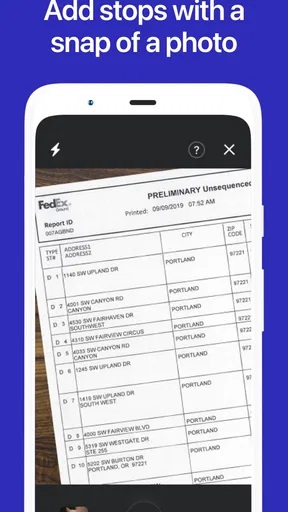
Upon opening the app, you’ll notice how everything is laid out clearly. You can easily input your delivery addresses manually, or if you’re feeling fancy, just snap a picture of your list. Yes, you heard that right! The app can read your handwritten addresses and add them to your route. It’s like magic, and it saves a ton of time.
Planning Around a Shared Day
Picture a weekday when one adult needs to collect a parcel, make a few household stops, and then head to a scheduled pickup. With several addresses to deal with, deciding their order while already on the road can add needless stress. I would put the destinations together before leaving, review the proposed sequence, and use the navigation while driving. That keeps route planning separate from the more distracting task of watching the road.
The photo option can be handy when a list has been written by someone else in the household, but I would treat it as a shortcut rather than a guarantee. Handwriting, abbreviated street names, and apartment details can be easy to misread. I’d check every recognized address against the original list before starting, particularly when a wrong stop would mean a long detour. That quick verification is a small habit with a useful payoff.
For a shared device, I’d also agree on a simple handoff routine: the person preparing the route should make sure the driver has the right list and can see the next destination before setting off. A routing app can organize stops, but it cannot settle who is responsible for an errand or whether a pickup time has changed. Keeping those details clear between people matters more than trying to make the app serve as a household task manager.
The Power of Mapbox
Now, let’s talk about the powerhouse behind Straightaway: Mapbox. This isn’t just your average map service. With Mapbox, the app provides incredibly detailed and accurate maps, which is crucial when you’re on the clock. You get real-time traffic updates, so you can dodge those pesky jams like a pro. No more getting stuck because of a wrong turn; Mapbox has got your back.
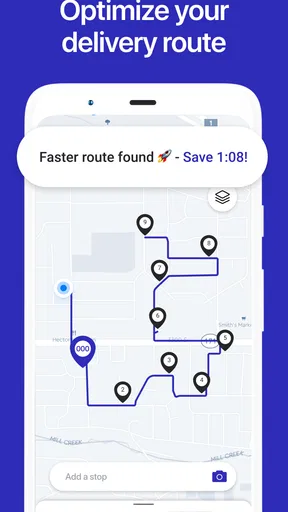
One of the coolest features is the app’s ability to optimize routes. It analyzes your stops and calculates the best possible path, saving you both time and fuel. It’s like having a super-efficient co-pilot guiding you every step of the way. Plus, the app updates your route dynamically if there are any changes in traffic conditions. It’s like having a sixth sense for the road.
Making the Route Useful, Not Just Short
Route optimization is most helpful when you have enough stops for their order to make a noticeable difference. If I had a set of deliveries across town, I’d use the suggested sequence as a starting point, then think through constraints the map cannot judge for me: a recipient’s availability, a shop’s opening hours, or a parcel that needs to stay secure in the car. A route can be efficient on the map and still be wrong for the day if it ignores the real reason for each stop.
That is also why I would not assume “optimized” always means the best route for every driver. The app can help arrange destinations and respond to traffic, but the person behind the wheel still needs to consider loading, parking, access, and any time-sensitive commitments. If a stop has to happen first, the practical move is to plan around that requirement rather than blindly following a sequence that looks neat.
Compared with opening a standard navigation app and entering destinations one by one, a multi-stop planner puts more emphasis on deciding the order of a whole run. That can reduce the mental work of backtracking, while a conventional map app may remain preferable for a one-off trip or when a driver wants to handle each destination individually. I see Straightaway as a focused tool for a route with several stops, not a reason to replace every map app on a phone.
User Experience and Interface
Now, I know what you’re thinking: “All these features sound great, but is it easy to use?” The answer is a resounding yes. The user interface is sleek and straightforward. You don’t need to be a tech wizard to navigate through the app. Everything is where you’d expect it to be, and the learning curve is practically non-existent.
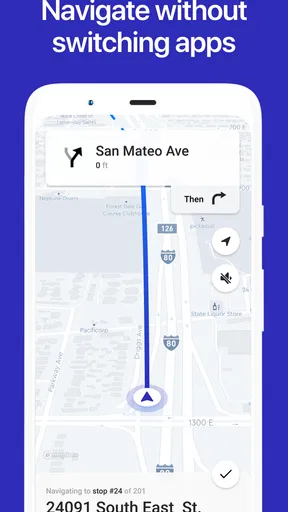
One thing I really appreciate is the voice-guided navigation. It’s clear and precise, leaving no room for confusion. Whether you’re on a busy highway or a quiet country road, the app ensures you know exactly where to go. And if you’re the type who likes a little visual aid, the map view is crisp and detailed, making it easy to spot your next turn.
Household Setup and Account Boundaries
For two people who sometimes share a phone, it is worth deciding who will enter the addresses and who will drive before a route is underway. This is a simple boundary, not a special family feature: one person can prepare the stops, while the driver checks the route and takes responsibility for following it. If each person has a separate phone, each can make their own plan when needed rather than treating one device as a shared household calendar.
I would avoid assuming that a route created by one person automatically communicates every detail to another. The useful information here is the ordered set of destinations and the directions while travelling; changes to plans, delivery notes, or who is covering a stop still need to be conveyed clearly between people. For a household that already coordinates through messages or a shared list, Straightaway can complement that routine, but it does not replace it.
There is a practical privacy angle, too. A list of addresses can reveal where people live, work, or expect a delivery. I’d only photograph a list that is actually needed for the route, check the recognized text, and avoid leaving someone else’s personal details visible on a shared screen after the trip. Those are sensible habits for any navigation tool that handles real destinations, especially when a device passes between family members.
Age, Trust, and Driver Responsibility
The app is rated for Everyone, but that does not make it a driving tool for children. In a household, I’d keep route setup and navigation in the hands of the adult or otherwise qualified driver. Younger family members may be able to help read a paper list before the journey, but the person driving should be the one who confirms the route and follows directions safely.
Voice guidance can reduce the need to keep looking at a screen, but no navigation app can remove the need for attention. I’d set up the route while parked, use spoken directions as an aid, and pull over before making changes. If a driver needs detailed control over every turn or has complicated accessibility or vehicle requirements, it makes sense to compare the app with other navigation options before relying on it for a demanding trip.
There is also a trust question when somebody else prepares the addresses. Before leaving, the driver should confirm that the stops belong to the intended run and that the order fits the day. This is especially useful when household errands and paid deliveries are mixed together: keeping personal stops distinct from work stops helps avoid confusion, missed handoffs, or accidentally taking the wrong list.
Who Benefits—and Who May Prefer Another Map
I can see this being most useful for a courier, a small delivery operation, or anyone who repeatedly visits several addresses in one outing. It can also help a household member handling a long errand chain, provided the destinations are known before the drive. The appeal is less about fancy map browsing and more about reducing the effort of deciding how to get through a multi-stop run.
If you mainly need directions to a single place, a general-purpose navigation app will probably be enough and may feel more familiar. If your stops change constantly or depend on complicated appointments, a route planner will not solve the coordination problem by itself. And if you prefer to make every routing decision manually, automatic sequencing may not match your style. The best fit is someone who welcomes a suggested order but is still willing to review it.
One useful workflow is to prepare the route when the address list is complete, verify any details that came from handwriting, and then make a final pass for fixed-time stops. That is more reliable than adding destinations in a hurry from the driver’s seat. If a new stop appears later, pause somewhere safe and reconsider the whole sequence instead of assuming the existing route remains the most sensible one.
Why Straightaway Stands Out
There are plenty of routing apps out there, but what sets Straightaway Powered by Mapbox apart is its seamless integration of technology and user-centric design. The app feels like it was made with real people in mind, addressing the everyday challenges faced by delivery drivers.
It’s not just about getting from point A to B; it’s about doing it efficiently and effortlessly. With features like route optimization, real-time traffic updates, and easy address input, the app truly stands out as a must-have for anyone in the delivery business. Plus, the constant updates ensure that it only gets better with time.
Another thing worth mentioning is the reliability of the app. It’s stable, doesn’t crash unexpectedly, and runs smoothly even on older devices. This kind of reliability is crucial when you’re out on the road, making every delivery count.
There are a few practical considerations before making it part of a routine. Straightaway is free to download, while in-app purchases range from $9.99 to $95.99 per item, so I’d check the available purchase details in the app before committing to anything. Its average rating is 3.3 from 164 ratings, with 85 written reviews, and it has passed 50K installs. Those figures suggest there is a real user base, but I would still try it with a modest route before building a workday around it.
The app was released on December 12, 2019, and its current version is 5.3.1. It requires Android 8.0 or later, which is worth checking if you plan to use an older household phone as the dedicated navigation device. Since a driver relies on a phone throughout a route, I’d also make sure the device itself is in good working order and that the person using it is comfortable with the interface before taking on a time-sensitive run.
Final Thoughts
So, there you have it! Straightaway Powered by Mapbox is more than just a route planner; it’s a game-changer for delivery drivers. The combination of smart technology, user-friendly interface, and reliable performance makes it a standout app in its category.
If you’re looking to streamline your delivery process and save some precious time, this app is definitely worth a shot. It’s like having a trusty sidekick who’s always ready to guide you on your delivery adventures. So why not give it a try? You might just find that it’s exactly what you’ve been looking for.
My household verdict is more measured: I’d recommend trying it when one person regularly handles a batch of stops and benefits from having their order mapped out. I would not install it for every family member just because it is available, or expect it to coordinate schedules and responsibilities. Used by the right driver, with addresses checked and the route reviewed before departure, Straightaway can make a busy multi-stop day feel more manageable; for occasional single-destination trips, a familiar map app remains the simpler choice.
Verdict
Strengths of Straightaway Powered by Mapbox
- User-friendly interface enhances navigation
- Real-time updates for accurate routing
- Customizable routes for personal needs
- Offline maps available for remote areas
- Efficient use of battery life
Limitations of Straightaway Powered by Mapbox
- Limited integration with third-party apps
- Occasional lag in real-time traffic data
- Subscription required for premium features
- Some features locked to specific regions
- Initial setup can be time-consuming
Similar Picks in This Category
View All
Uber - Request a ride
Uber Technologies, Inc.4.7


inDrive. Rides with fair fares
® SUOL INNOVATIONS LTD4.8

Yandex Go: Taxi Food Delivery
Mikromobilnost LLC Belgrade4.8

Bolt: Request a Ride
Bolt Technology4.8

Rapido: Bike-Taxi, Auto & Cabs
Rapido Bike Taxi4.8
Frequently Asked Questions
What is Straightaway Powered by Mapbox?
Straightaway is a navigation app designed to optimize delivery routes, helping users save time and fuel. Powered by Mapbox, it offers real-time traffic updates, turn-by-turn directions, and the ability to import customer addresses directly from spreadsheets. It's particularly useful for delivery drivers and logistics managers.
How does Straightaway improve route planning?
Straightaway improves route planning by analyzing multiple stops and using advanced algorithms to determine the most efficient sequence. This minimizes travel time and distance, allowing users to complete more deliveries in less time. The app also adapts to real-time traffic conditions to ensure optimal routing.
Is Straightaway suitable for all types of delivery services?
Yes, Straightaway is designed for a wide range of delivery services, from small businesses to large logistics companies. Whether you're delivering food, packages, or supplies, the app's flexible route optimization caters to various needs and scales, making it a versatile tool for any delivery-based operation.
Can I use Straightaway offline?
While Straightaway primarily relies on internet connectivity for real-time updates and map data, it does offer offline capabilities. Users can download maps and planned routes in advance, ensuring they can navigate even in areas with poor or no internet connectivity, which is crucial for remote deliveries.
What are the subscription options for Straightaway?
Straightaway offers a free trial to let users experience its features before committing. Post-trial, it provides several subscription tiers tailored to different needs, from individual drivers to enterprise solutions. Pricing varies based on the number of users and required features, making it accessible to businesses of all sizes.
